Describe the bug
Handshake failure error occurd when websocket client connect to Pulsar(Standalone mode) ;
But its worked well on Win10 or Android or use other client(like Java Client);
After anaylise logs and src code, i guess the bug occured because DISMATCH cipher suite between pulsar wss and ws client
To Reproduce
Steps to reproduce the behavior:
- User C#/JS websocket client connect to pulsar wss service
- client shows "disconnected" immediately
- Use wireshark grap data from net traffic, after client hello ,it shows "Level: Fatal, Handshake failure(40)" from server side
- In pulsar debug log, it shows
javax.net.ssl.SSLHandshakeException: Read error: ssl=0x7f81c401f458: Failure in SSL library, usually a protocol error error:100000b8:SSL routines:OPENSSL_internal:NO_SHARED_CIPHER (../ssl/handshake_server.cc:718 0x7f80390d5700:0x00000000)
Expected behavior
Successful wss connection expected on Win7/8
Configurations
- Server side: Pulsar 2.9.1 standalone; OpenJDK1.8 (after upgrade to openjdk11,still not working);OpenSSL(1.1.1c);Use self-signed certifacate;configs in pulsar standalone.conf
webServicePortTls=8443
brokerServicePortTls=6651
tlsCertificateFilePath=../CA/broker.cert.pem
tlsKeyFilePath=../CA/broker.key-pk8.pem
tlsTrustCertsFilePath=../CA/certs/ca.cert.pem
tlsAllowInsecureConnection=false

tlsProtocols=TLSv1.2,TLSv1.1,TLSv1
tlsCiphers=

tlsRequireTrustedClientCertOnConnect=false
tlsEnabledWithKeyStore=false

# TLS Provider for KeyStore type
tlsProvider=
tlsKeyStoreType=JKS
tlsKeyStore=
tlsKeyStorePassword=
tlsTrustStoreType=JKS
tlsTrustStore=
tlsTrustStorePassword=
brokerClientTlsEnabledWithKeyStore=false
brokerClientSslProvider=
brokerClientTlsTrustStoreType=JKS
brokerClientTlsTrustStore=
brokerClientTlsTrustStorePassword=
brokerClientTlsCiphers=
brokerClientTlsProtocols=
- Client side: Win7/8 C# (with .Net Framework 4.8+) or Javascript client on Chrome/IE
Operations、Screenshots and My personal anaylise
- Pulsar startup logs:(it shows that pulsar broker use OpenSSL as its TLS support)
10:49:32.044 [main] DEBUG io.netty.handler.ssl.OpenSsl - Supported protocols (OpenSSL): [SSLv2Hello, TLSv1, TLSv1.1, TLSv1.2, TLSv1.3]
10:49:32.044 [main] DEBUG io.netty.handler.ssl.OpenSsl - Default cipher suites (OpenSSL): [TLS_ECDHE_ECDSA_WITH_AES_256_GCM_SHA384, TLS_ECDHE_ECDSA_WITH_AES_128_GCM_SHA256, TLS_ECDHE_RSA_WITH_AES_128_GCM_SHA256, TLS_ECDHE_RSA_WITH_AES_256_GCM_SHA384, TLS_ECDHE_RSA_WITH_AES_128_CBC_SHA, TLS_ECDHE_RSA_WITH_AES_256_CBC_SHA, TLS_RSA_WITH_AES_128_GCM_SHA256, TLS_RSA_WITH_AES_128_CBC_SHA, TLS_RSA_WITH_AES_256_CBC_SHA, TLS_AES_128_GCM_SHA256, TLS_AES_256_GCM_SHA384, TLS_AES_128_GCM_SHA256, TLS_AES_256_GCM_SHA384]
10:49:32.046 [main] INFO  org.apache.pulsar.broker.service.BrokerService - Started Pulsar Broker TLS service on /0.0.0.0:6651 - TLS provider: OPENSSL
-
Use c# websocket client connect to pulsar wss port on Win7, shows "Disconnected" immediately
-
Use Wireshark grap net traffic data

-
Pulsar debug logs:
09:28:02.059 [pulsar-web-59-5] DEBUG org.eclipse.jetty.io.AbstractConnection - onClose HttpConnection@77e58cb6::DecryptedEndPoint@4e357b77{l=0.0.0.0/0.0.0.0:6683,r=null,CLOSED,fill=-,flush=-,to=156/30000}
09:28:02.059 [pulsar-web-59-15] DEBUG org.eclipse.jetty.server.HttpConnection -
javax.net.ssl.SSLHandshakeException: Read error: ssl=0x7f81c401f458: Failure in SSL library, usually a protocol error
error:100000b8:SSL routines:OPENSSL_internal:NO_SHARED_CIPHER (../ssl/handshake_server.cc:718 0x7f80390d5700:0x00000000)
	at org.conscrypt.SSLUtils.toSSLHandshakeException(SSLUtils.java:361) ~[org.conscrypt-conscrypt-openjdk-uber-2.5.2.jar:2.5.2]
	at org.conscrypt.ConscryptEngine.convertException(ConscryptEngine.java:1138) ~[org.conscrypt-conscrypt-openjdk-uber-2.5.2.jar:2.5.2]
	at org.conscrypt.ConscryptEngine.unwrap(ConscryptEngine.java:923) ~[org.conscrypt-conscrypt-openjdk-uber-2.5.2.jar:2.5.2]
	at org.conscrypt.ConscryptEngine.unwrap(ConscryptEngine.java:751) ~[org.conscrypt-conscrypt-openjdk-uber-2.5.2.jar:2.5.2]
	at org.conscrypt.ConscryptEngine.unwrap(ConscryptEngine.java:716) ~[org.conscrypt-conscrypt-openjdk-uber-2.5.2.jar:2.5.2]
	at org.conscrypt.Java8EngineWrapper.unwrap(Java8EngineWrapper.java:236) ~[org.conscrypt-conscrypt-openjdk-uber-2.5.2.jar:2.5.2]
	at org.eclipse.jetty.io.ssl.SslConnection.unwrap(SslConnection.java:429) ~[org.eclipse.jetty-jetty-io-9.4.43.v20210629.jar:9.4.43.v20210629]
	at org.eclipse.jetty.io.ssl.SslConnection$DecryptedEndPoint.fill(SslConnection.java:718) ~[org.eclipse.jetty-jetty-io-9.4.43.v20210629.jar:9.4.43.v20210629]
	at org.eclipse.jetty.server.HttpConnection.fillRequestBuffer(HttpConnection.java:345) [org.eclipse.jetty-jetty-server-9.4.43.v20210629.jar:9.4.43.v20210629]
	at org.eclipse.jetty.server.HttpConnection.onFillable(HttpConnection.java:260) [org.eclipse.jetty-jetty-server-9.4.43.v20210629.jar:9.4.43.v20210629]
	at org.eclipse.jetty.io.AbstractConnection$ReadCallback.succeeded(AbstractConnection.java:311) [org.eclipse.jetty-jetty-io-9.4.43.v20210629.jar:9.4.43.v20210629]
	at org.eclipse.jetty.io.FillInterest.fillable(FillInterest.java:105) [org.eclipse.jetty-jetty-io-9.4.43.v20210629.jar:9.4.43.v20210629]
	at org.eclipse.jetty.io.ssl.SslConnection$DecryptedEndPoint.onFillable(SslConnection.java:555) [org.eclipse.jetty-jetty-io-9.4.43.v20210629.jar:9.4.43.v20210629]
	at org.eclipse.jetty.io.ssl.SslConnection.onFillable(SslConnection.java:410) [org.eclipse.jetty-jetty-io-9.4.43.v20210629.jar:9.4.43.v20210629]
	at org.eclipse.jetty.io.ssl.SslConnection$2.succeeded(SslConnection.java:164) [org.eclipse.jetty-jetty-io-9.4.43.v20210629.jar:9.4.43.v20210629]
	at org.eclipse.jetty.io.FillInterest.fillable(FillInterest.java:105) [org.eclipse.jetty-jetty-io-9.4.43.v20210629.jar:9.4.43.v20210629]
	at org.eclipse.jetty.io.ChannelEndPoint$1.run(ChannelEndPoint.java:104) [org.eclipse.jetty-jetty-io-9.4.43.v20210629.jar:9.4.43.v20210629]
	at org.eclipse.jetty.util.thread.strategy.EatWhatYouKill.runTask(EatWhatYouKill.java:338) [org.eclipse.jetty-jetty-util-9.4.43.v20210629.jar:9.4.43.v20210629]
	at org.eclipse.jetty.util.thread.strategy.EatWhatYouKill.doProduce(EatWhatYouKill.java:315) [org.eclipse.jetty-jetty-util-9.4.43.v20210629.jar:9.4.43.v20210629]
	at org.eclipse.jetty.util.thread.strategy.EatWhatYouKill.tryProduce(EatWhatYouKill.java:173) [org.eclipse.jetty-jetty-util-9.4.43.v20210629.jar:9.4.43.v20210629]
	at org.eclipse.jetty.util.thread.strategy.EatWhatYouKill.run(EatWhatYouKill.java:131) [org.eclipse.jetty-jetty-util-9.4.43.v20210629.jar:9.4.43.v20210629]
	at org.eclipse.jetty.util.thread.ReservedThreadExecutor$ReservedThread.run(ReservedThreadExecutor.java:386) [org.eclipse.jetty-jetty-util-9.4.43.v20210629.jar:9.4.43.v20210629]
	at java.util.concurrent.ThreadPoolExecutor.runWorker(ThreadPoolExecutor.java:1128) [?:?]
	at java.util.concurrent.ThreadPoolExecutor$Worker.run(ThreadPoolExecutor.java:628) [?:?]
	at io.netty.util.concurrent.FastThreadLocalRunnable.run(FastThreadLocalRunnable.java:30) [io.netty-netty-common-4.1.72.Final.jar:4.1.72.Final]
	at java.lang.Thread.run(Thread.java:829) [?:?]
Caused by: javax.net.ssl.SSLProtocolException: Read error: ssl=0x7f81c401f458: Failure in SSL library, usually a protocol error
error:100000b8:SSL routines:OPENSSL_internal:NO_SHARED_CIPHER (../ssl/handshake_server.cc:718 0x7f80390d5700:0x00000000)
	at org.conscrypt.NativeCrypto.ENGINE_SSL_read_direct(Native Method) ~[org.conscrypt-conscrypt-openjdk-uber-2.5.2.jar:2.5.2]
	at org.conscrypt.NativeSsl.readDirectByteBuffer(NativeSsl.java:567) ~[org.conscrypt-conscrypt-openjdk-uber-2.5.2.jar:2.5.2]
	at org.conscrypt.ConscryptEngine.readPlaintextDataDirect(ConscryptEngine.java:1099) ~[org.conscrypt-conscrypt-openjdk-uber-2.5.2.jar:2.5.2]
	at org.conscrypt.ConscryptEngine.readPlaintextDataHeap(ConscryptEngine.java:1119) ~[org.conscrypt-conscrypt-openjdk-uber-2.5.2.jar:2.5.2]
	at org.conscrypt.ConscryptEngine.readPlaintextData(ConscryptEngine.java:1091) ~[org.conscrypt-conscrypt-openjdk-uber-2.5.2.jar:2.5.2]
	at org.conscrypt.ConscryptEngine.unwrap(ConscryptEngine.java:880) ~[org.conscrypt-conscrypt-openjdk-uber-2.5.2.jar:2.5.2]
	... 23 more
-
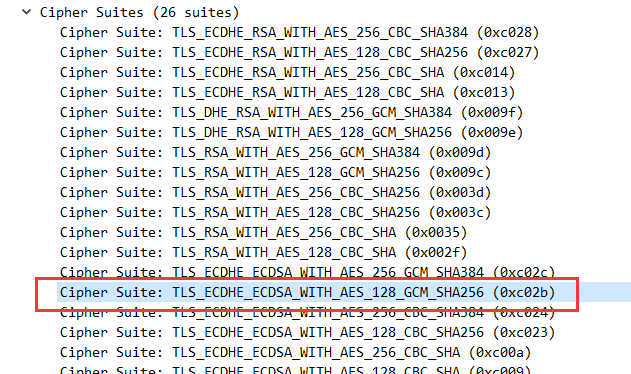
Anaylise client handshake data trans, in "Client Hello" request: cipher suites list

-
Use SSL_Scan tool to scan pulsar wss port:
Version: 2.0.11 Windows 64-bit (Mingw)
OpenSSL 1.1.1e-dev  xx XXX xxxx

Connected to 192.168.3.112

Testing SSL server 192.168.3.112 on port 8443 using SNI name 192.168.3.112

  SSL/TLS Protocols:
TLSv1.0   disabled
TLSv1.1   disabled
TLSv1.2   enabled
TLSv1.3   enabled

  TLS Fallback SCSV:
Server supports TLS Fallback SCSV

  TLS renegotiation:
Session renegotiation not supported

  TLS Compression:
Compression disabled

  Heartbleed:
TLSv1.3 not vulnerable to heartbleed
TLSv1.2 not vulnerable to heartbleed

  Supported Server Cipher(s):
Preferred TLSv1.3  256 bits  TLS_CHACHA20_POLY1305_SHA256  Curve 25519 DHE 253
Accepted  TLSv1.3  128 bits  TLS_AES_128_GCM_SHA256        Curve 25519 DHE 253
Accepted  TLSv1.3  256 bits  TLS_AES_256_GCM_SHA384        Curve 25519 DHE 253
Preferred TLSv1.2  256 bits  ECDHE-RSA-CHACHA20-POLY1305   Curve 25519 DHE 253
Accepted  TLSv1.2  128 bits  ECDHE-RSA-AES128-GCM-SHA256   Curve 25519 DHE 253
Accepted  TLSv1.2  256 bits  ECDHE-RSA-AES256-GCM-SHA384   Curve 25519 DHE 253

  Server Key Exchange Group(s):
TLSv1.3  128 bits  secp256r1 (NIST P-256)
TLSv1.3  192 bits  secp384r1 (NIST P-384)
TLSv1.3  128 bits  x25519
TLSv1.2  128 bits  secp256r1 (NIST P-256)
TLSv1.2  192 bits  secp384r1 (NIST P-384)
TLSv1.2  128 bits  x25519

  SSL Certificate:
Signature Algorithm: sha256WithRSAEncryption
RSA Key Strength:    2048

Subject:  192.168.3.112
Issuer:   Test Pulsar

Not valid before: Dec 22 01:51:46 2021 GMT
Not valid after:  Sep 17 01:51:46 2024 GMT
- Scan port 6651(broker tls) findout that pulsar 6651 supported more cipher suite(default set tlsCiphers=) than 8443 wss port, and its match configuration with tlsProtocols options(i remove tlsv1.3) in conf/standalone.conf file
Connected to 192.168.3.112

Testing SSL server 192.168.3.112 on port 6651 using SNI name 192.168.3.112

  SSL/TLS Protocols:
**TLSv1.0   enabled
TLSv1.1   enabled
TLSv1.2   enabled
TLSv1.3   disabled**

  TLS Fallback SCSV:
Server supports TLS Fallback SCSV

  TLS renegotiation:
Secure session renegotiation supported

  TLS Compression:
Compression disabled

  Heartbleed:
TLSv1.2 not vulnerable to heartbleed
TLSv1.1 not vulnerable to heartbleed
TLSv1.0 not vulnerable to heartbleed

  Supported Server Cipher(s):
Preferred TLSv1.2  128 bits  ECDHE-RSA-AES128-GCM-SHA256   Curve 25519 DHE 253
Accepted  TLSv1.2  256 bits  ECDHE-RSA-AES256-GCM-SHA384   Curve 25519 DHE 253
Accepted  TLSv1.2  128 bits  ECDHE-RSA-AES128-SHA          Curve 25519 DHE 253
Accepted  TLSv1.2  256 bits  ECDHE-RSA-AES256-SHA          Curve 25519 DHE 253
Accepted  TLSv1.2  128 bits  AES128-GCM-SHA256
Accepted  TLSv1.2  128 bits  AES128-SHA
Accepted  TLSv1.2  256 bits  AES256-SHA
Preferred TLSv1.1  128 bits  ECDHE-RSA-AES128-SHA          Curve 25519 DHE 253
Accepted  TLSv1.1  256 bits  ECDHE-RSA-AES256-SHA          Curve 25519 DHE 253
Accepted  TLSv1.1  128 bits  AES128-SHA
Accepted  TLSv1.1  256 bits  AES256-SHA
Preferred TLSv1.0  128 bits  ECDHE-RSA-AES128-SHA          Curve 25519 DHE 253
Accepted  TLSv1.0  256 bits  ECDHE-RSA-AES256-SHA          Curve 25519 DHE 253
Accepted  TLSv1.0  128 bits  AES128-SHA
Accepted  TLSv1.0  256 bits  AES256-SHA

  Server Key Exchange Group(s):
TLSv1.2  128 bits  secp256r1 (NIST P-256)
TLSv1.2  192 bits  secp384r1 (NIST P-384)
TLSv1.2  128 bits  x25519

  SSL Certificate:
Signature Algorithm: sha256WithRSAEncryption
RSA Key Strength:    2048

Subject:  192.168.3.112
Issuer:   Test Pulsar
- As DOCs said
Pulsar uses OpenSSL if the OpenSSL is available, but if the OpenSSL is not available, Pulsar defaults back to the JDK implementation
I think its worked just for broker tls(6651)
- Change tlsProtocols/tisCiphers does NOT effect wss(8443) tls support
- Define brokerClientTlsCiphers/brokerClientTlsProtocols does NOT effect wss(8443) tls support
- Upgrade OpenJDK1.8 to OpenJDK11 or chage java.security 's jdk.tls.disabledAlgorithmsdoes NOT working
- Question : Why Pulsar WSS(8443) support only 6 ciphers by default and can not be configured ? or where can i change/define its supported ciphers ? Pulsar Websocket TLS support come from which component?
pulsar websocket service use jetty handle tls http( supported by Conscrypto)
found jetty load ciphers in startup logs
11:54:31.913 [main] DEBUG org.eclipse.jetty.util.ssl.SslContextFactory - Selected Protocols [TLSv1, TLSv1.1, TLSv1.2, TLSv1.3] of [TLSv1, TLSv1.1, TLSv1.2, TLSv1.3]
11:54:31.913 [main] DEBUG org.eclipse.jetty.util.ssl.SslContextFactory - Selected Ciphers   [TLS_AES_128_GCM_SHA256, TLS_AES_256_GCM_SHA384, TLS_CHACHA20_POLY1305_SHA256, TLS_ECDHE_ECDSA_WITH_CHACHA2
0_POLY1305_SHA256, TLS_ECDHE_ECDSA_WITH_AES_128_GCM_SHA256, TLS_ECDHE_ECDSA_WITH_AES_256_GCM_SHA384, TLS_ECDHE_RSA_WITH_CHACHA20_POLY1305_SHA256, TLS_ECDHE_RSA_WITH_AES_128_GCM_SHA256, TLS_ECDHE_RSA_
WITH_AES_256_GCM_SHA384, TLS_EMPTY_RENEGOTIATION_INFO_SCSV] of [TLS_AES_128_GCM_SHA256, TLS_AES_256_GCM_SHA384, TLS_CHACHA20_POLY1305_SHA256, TLS_ECDHE_ECDSA_WITH_CHACHA20_POLY1305_SHA256, TLS_ECDHE_
RSA_WITH_CHACHA20_POLY1305_SHA256, TLS_ECDHE_PSK_WITH_CHACHA20_POLY1305_SHA256, TLS_ECDHE_ECDSA_WITH_AES_128_GCM_SHA256, TLS_ECDHE_RSA_WITH_AES_128_GCM_SHA256, TLS_ECDHE_ECDSA_WITH_AES_256_GCM_SHA384
, TLS_ECDHE_RSA_WITH_AES_256_GCM_SHA384, TLS_ECDHE_ECDSA_WITH_AES_128_CBC_SHA, TLS_ECDHE_RSA_WITH_AES_128_CBC_SHA, TLS_ECDHE_PSK_WITH_AES_128_CBC_SHA, TLS_ECDHE_ECDSA_WITH_AES_256_CBC_SHA, TLS_ECDHE_
RSA_WITH_AES_256_CBC_SHA, TLS_ECDHE_PSK_WITH_AES_256_CBC_SHA, TLS_RSA_WITH_AES_128_GCM_SHA256, TLS_RSA_WITH_AES_256_GCM_SHA384, TLS_RSA_WITH_AES_128_CBC_SHA, TLS_PSK_WITH_AES_128_CBC_SHA, TLS_RSA_WIT
H_AES_256_CBC_SHA, TLS_PSK_WITH_AES_256_CBC_SHA, SSL_RSA_WITH_3DES_EDE_CBC_SHA, TLS_EMPTY_RENEGOTIATION_INFO_SCSV, TLS_FALLBACK_SCSV]
11:54:31.915 [main] DEBUG org.eclipse.jetty.util.ssl.SslContextFactory - Customize org.conscrypt.Java8EngineWrapper@35570a84
noticed that: jetty select only xxx_GCM_SHAxxx or xxx_POLY1305_SHAxxx from support cipher list
so the question again: where jetty load and decide which tls cipher support?
from SslContectFactory src code:
selectCipherSuites(enabled.getCipherSuites(), supported.getCipherSuites());
....
in method : processIncludeExcludePatterns
there is DEFAULT include/exclude pattern to choose ciphers:

    private static final String[] DEFAULT_EXCLUDED_CIPHER_SUITES = {
        // Exclude weak / insecure ciphers
        "^.*_(MD5|SHA|SHA1)$",
        // Exclude ciphers that don't support forward secrecy
        "^TLS_RSA_.*$",
        // The following exclusions are present to cleanup known bad cipher
        // suites that may be accidentally included via include patterns.
        // The default enabled cipher list in Java will not include these
        // (but they are available in the supported list).
        "^SSL_.*$",
        "^.*_NULL_.*$",
        "^.*_anon_.*$"
    };
ok, its exclude weak and bad name cipher ( removed all xxx_CBC_SHA)
if i guess right, when Win7/8 client support xxx_CBC_SHA mostly, server did not support.
but where jetty decide SUPPORTED ciphers? from src code
something like this:
SslContextFactory.SSLContext getSupportedSSLParameters.getCipherSuites()

sslEngine.setSSLParameters(customize(sslEngine.getSSLParameters()));

in customize:
if (_selectedCipherSuites != null)
            sslParams.setCipherSuites(_selectedCipherSuites);
also from debug log:
11:54:31.915 [main] DEBUG org.eclipse.jetty.util.ssl.SslContextFactory - Customize org.conscrypt.Java8EngineWrapper@35570a84
11:54:31.918 [main] DEBUG org.eclipse.jetty.util.component.AbstractLifeCycle - STARTED @36002ms SslContextFactoryWithAutoRefresh@79e33802[provider=Conscrypt,keyStore=null,trustStore=null]
11:54:32.007 [main] DEBUG org.eclipse.jetty.util.ssl.SslContextFactory - Customize org.conscrypt.Java8EngineWrapper@380ea757
11:54:32.010 [main] DEBUG org.eclipse.jetty.util.component.AbstractLifeCycle - STARTED @36094ms SslConnectionFactory@7a285418{SSL->HTTP/1.1}
11:54:32.010 [main] DEBUG org.eclipse.jetty.util.component.AbstractLifeCycle - starting HttpConnectionFactory@7e9d171c[HTTP/1.1]
11:54:32.011 [main] DEBUG org.eclipse.jetty.util.component.AbstractLifeCycle - STARTED @36095ms HttpConnectionFactory@7e9d171c[HTTP/1.1]
11:54:32.011 [main] DEBUG org.eclipse.jetty.util.component.AbstractLifeCycle - starting SelectorManager@PulsarServerConnector@74471600{SSL, (ssl, http/1.1)}{0.0.0.0:8443}
shows that jetty use Consrypto.Java8EngineWrapper(i guest its ConscrpytoEngine)
and where did jetty set _selectedCipherSuites in SslContextFactory ?
from ssl_conext creation:
        SSLContext sslCtx = CONSCRYPT_PROVIDER != null ? SSLContext.getInstance("TLS", CONSCRYPT_PROVIDER)
                : SSLContext.getInstance("TLS");
        sslCtx.init(keyManagers, trustManagers, new SecureRandom());
        sslCtx.getDefaultSSLParameters();
i guess SSLContext set sslParameters(which defined support cipher suites) by CONSCRYPT_PROVIDER
so i come to Conscypto github site and findout what ciphers its support
https://github.com/google/conscrypt/blob/master/CAPABILITIES.md
TLS 1.0-1.2
TLS_ECDHE_ECDSA_WITH_AES_128_CBC_SHA
TLS_ECDHE_ECDSA_WITH_AES_128_GCM_SHA256
TLS_ECDHE_ECDSA_WITH_AES_256_CBC_SHA
TLS_ECDHE_ECDSA_WITH_AES_256_GCM_SHA384
TLS_ECDHE_ECDSA_WITH_CHACHA20_POLY1305_SHA256
TLS_ECDHE_RSA_WITH_AES_128_CBC_SHA
TLS_ECDHE_RSA_WITH_AES_128_GCM_SHA256
TLS_ECDHE_RSA_WITH_AES_256_CBC_SHA
TLS_ECDHE_RSA_WITH_AES_256_GCM_SHA384
TLS_ECDHE_RSA_WITH_CHACHA20_POLY1305_SHA256
TLS_RSA_WITH_AES_128_CBC_SHA
TLS_RSA_WITH_AES_128_GCM_SHA256
TLS_RSA_WITH_AES_256_CBC_SHA
TLS_RSA_WITH_AES_256_GCM_SHA384
yes, pulsar use conscrypto's ciphers as its websocket tls support
But i found that " TLS_ECDHE_ECDSA_WITH_AES_128_GCM_SHA256" is selected from startup logs
and my c# client support this cipher , still got no share cipher error
i found pulsar jetty selected many ciphers ,and selected TLSv1.1 , TLSv1 , but when i scan WSS port it shows that
only support tlsv1.2, tlsv1.3
so why pulsar jetty failed on tls handshake when its has right cipher?
whats real supported cipher suites in jetty SSL Context/connection/session?
Finally
So is this a BUG or where i missing / wrong with pulsar src code please point out
if im correct , how to set/add/config more cipher support by pulsar websocket TLS service(because for some reason i cant change client side code ) ?
Describe the bug
Handshake failure error occurd when websocket client connect to Pulsar(Standalone mode) ;
But its worked well on Win10 or Android or use other client(like Java Client);
After anaylise logs and src code, i guess the bug occured because DISMATCH cipher suite between pulsar wss and ws client
To Reproduce
Steps to reproduce the behavior:
javax.net.ssl.SSLHandshakeException: Read error: ssl=0x7f81c401f458: Failure in SSL library, usually a protocol error error:100000b8:SSL routines:OPENSSL_internal:NO_SHARED_CIPHER (../ssl/handshake_server.cc:718 0x7f80390d5700:0x00000000)Expected behavior
Successful wss connection expected on Win7/8
Configurations
Operations、Screenshots and My personal anaylise
Use c# websocket client connect to pulsar wss port on Win7, shows "Disconnected" immediately
Use Wireshark grap net traffic data

Pulsar debug logs:
Anaylise client handshake data trans, in "Client Hello" request: cipher suites list

Use SSL_Scan tool to scan pulsar wss port:
pulsar websocket service use jetty handle tls http( supported by Conscrypto)
found jetty load ciphers in startup logs
noticed that: jetty select only xxx_GCM_SHAxxx or xxx_POLY1305_SHAxxx from support cipher list
so the question again: where jetty load and decide which tls cipher support?
from SslContectFactory src code:
ok, its exclude weak and bad name cipher ( removed all xxx_CBC_SHA)
if i guess right, when Win7/8 client support xxx_CBC_SHA mostly, server did not support.
but where jetty decide SUPPORTED ciphers? from src code
also from debug log:
shows that jetty use Consrypto.Java8EngineWrapper(i guest its ConscrpytoEngine)
and where did jetty set _selectedCipherSuites in SslContextFactory ?
from ssl_conext creation:
i guess SSLContext set sslParameters(which defined support cipher suites) by CONSCRYPT_PROVIDER
so i come to Conscypto github site and findout what ciphers its support
https://github.com/google/conscrypt/blob/master/CAPABILITIES.md
yes, pulsar use conscrypto's ciphers as its websocket tls support
But i found that " TLS_ECDHE_ECDSA_WITH_AES_128_GCM_SHA256" is selected from startup logs

and my c# client support this cipher , still got no share cipher error
i found pulsar jetty selected many ciphers ,and selected TLSv1.1 , TLSv1 , but when i scan WSS port it shows that
only support tlsv1.2, tlsv1.3
so why pulsar jetty failed on tls handshake when its has right cipher?
whats real supported cipher suites in jetty SSL Context/connection/session?
Finally
So is this a BUG or where i missing / wrong with pulsar src code please point out
if im correct , how to set/add/config more cipher support by pulsar websocket TLS service(because for some reason i cant change client side code ) ?