Extract hardcoded (burned-in) subtitles from videos using the Tesseract OCR engine.
This is an enhanced fork of apm1467/videocr.
Input a video with hardcoded subtitles:
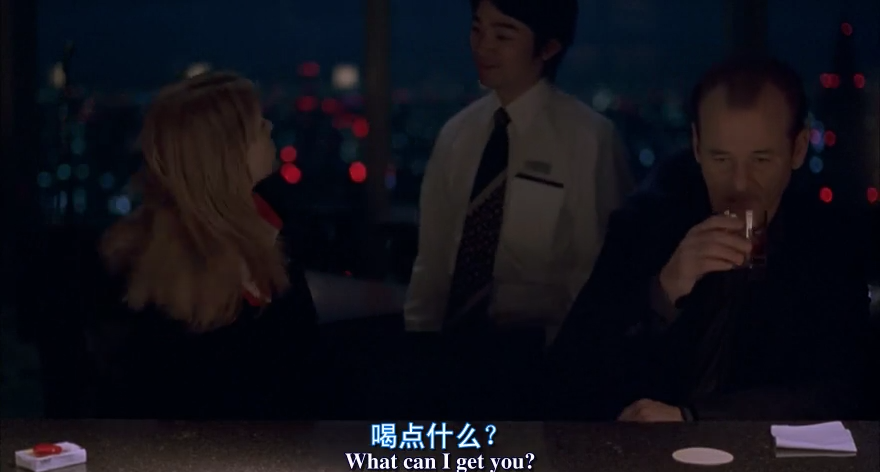

videocr input.mkv output.srt --lang "chi_sim+eng" --similarity-threshold 70 --confidence-threshold 65 --brightness-threshold 150Output:
0
00:00:01,042 --> 00:00:02,877
喝 点 什么 ?
What can I get you?

1
00:00:03,044 --> 00:00:05,463
我 不 知道
Um, I'm not sure.

2
00:00:08,091 --> 00:00:10,635
休闲 时 光 …
For relaxing times, make it...

3
00:00:10,677 --> 00:00:12,595
三 得 利 时 光
Bartender, Bob Suntory time.

4
00:00:14,472 --> 00:00:17,142
我 要 一 杯 伏特 加
Un, I'll have a vodka tonic.

5
00:00:18,059 --> 00:00:19,019
谢谢
Laughs Thanks.
The OCR process is CPU intensive. More CPU cores will make it faster.
--brightness-threshold will make it much faster and more accurate especially if subtitles are white.
--box allows you to reduce the area of the each frame image that needs to be processed (and thus make it faster)
--skip-frames will also make it a real lot faster.
--skip-framesshould not be higher than the duration of the shortest subtitle displayed in the video, or you might be unlucky and all the frames in which some of the subtitles appear will be skipped. You could of course also correct the few instances of this manually.- Skipping frames will make timestamps less accurate. This might not trouble you much if you skip every 10 frames in a 30fps video, because accuracy will still be 1/3rd of a second.
- Some videos have long subtitles (containing much text) that consequently are displayed for a long duration. You can then use a very high number for
--skip-frames
You can realign inaccurately synced subtitles with the audio by using one of the following tools:
- smacke/ffsubsync: WebRTC's VAD + FFT to maximize signal cross correlation
- sc0ty/subsync: does speech-to-text and looks for matching word morphemes
- kaegi/alass: rust-based subtitle synchronizer with a fancy dynamic programming algorithm
- tympanix/subsync: neural net based approach that optimizes directly for alignment when performing speech detection
- oseiskar/autosubsync: performs speech detection with bespoke spectrogram + logistic regression
- pums974/srtsync: similar approach to ffsubsync (WebRTC's VAD + FFT to maximize signal cross correlation)
-
clone this repo
-
add the package to your nixOS configuration
  environment.systemPackages = [
    (pkgs.callPackage <path-to-videocr-repo/nix> {})
];- or to your home-manager configuration
  home.packages = [
    (pkgs.callPackage <path-to-videocr-repo/nix> {})
  ];
- or install this python project in some classical python-ish way.
Run videocr --help (or videocr.sh --help or python -m videocr.main --help) for usage information.
You can also do from videocr import * from a python script to use the API. No promises that it won't change in the future though.
for most of the code to @apm1467 and for the brightness threshold to @devmaxxing