A unified SDK for building firmware across MADI and other microcontroller development boards.
Designed for portability and scalability, this SDK enables developers to write once and deploy across multiple hardware platforms with minimal changes.
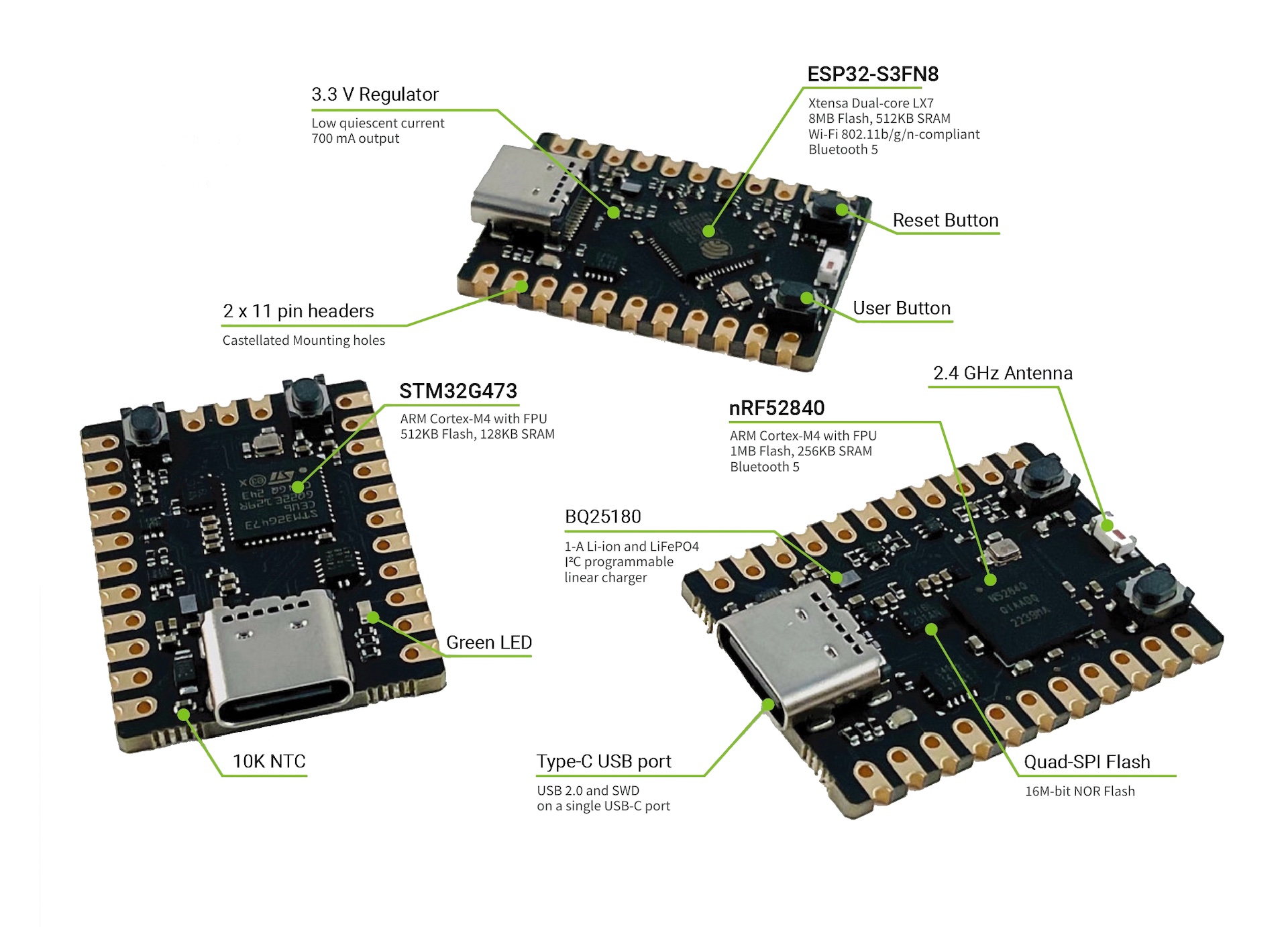
MADI is a development board based on various microcontroller chips with the same form factor of 21.59mm x 30mm. The board documentation can be found here and purchase can be made here.
.
├── external
│   ├── cbor
│   ├── libmcu
│   └── tinyusb
├── include
├── ports
│   ├── esp-idf
│   ├── freertos
│   └── zephyr
├── projects
├── src
└── tests| Directory | Description |
|---|---|
| external | External dependencies including all the third party libraries |
| include | Public headers |
| ports | Adapter codes for a specific hardware or platform |
| projects | Build rules |
| src | The application-specific code, including private headers |
| tests | Automated tests |
| tools | Tools and utilities |
Please refer to Getting Started Guide.
Install the Zephyr SDK outside this repo using west:
west init $HOME/zephyr
cd $HOME/zephyr
west update
Expected layout:
$HOME/zephyr/
├── zephyr/          # Zephyr kernel ($ZEPHYR_BASE)
├── modules/         # hal_nordic, mbedtls, littlefs, segger …
└── bootloader/      # mcuboot
Download arm-none-eabi from
developer.arm.com
and extract, e.g. to ~/.local/gcc-arm-none-eabi/.
brew install ninja              # macOS
sudo apt install ninja-build # Ubuntu / Debian| Tool | Use |
|---|---|
nrfjprog |
J-Link / nRF5 — initial flash and app updates |
pyocd |
OpenOCD-based alternative to nrfjprog |
mcumgr |
OTA / DFU over serial or BLE |
python3 -m venv .venv
source .venv/bin/activate
export PATH=.venv/bin:$PATH

export ZEPHYR_BASE=$HOME/zephyr/zephyr
export ZEPHYR_TOOLCHAIN_VARIANT=gnuarmemb
export GNUARMEMB_TOOLCHAIN_PATH=~/.local/gcc-arm-none-eabi
pip install -r $ZEPHYR_BASE/../bootloader/mcuboot/scripts/requirements.txtInstall Zephyr script dependencies in the active Python environment:
pip install -r $ZEPHYR_BASE/scripts/requirements.txtMissing this step commonly fails with
ModuleNotFoundError(for examplepykwalify) during board discovery.
- IDF root (example):
$HOME/esp/esp-idf - tools path (default
IDF_TOOLS_PATH):$HOME/.espressif
brew install ninja              # macOS
sudo apt install ninja-build # Ubuntu / DebianAdd to your shell profile (.bashrc / .zshrc) and reload:
source .venv/bin/activate
export PATH=.venv/bin:$PATH

export ZEPHYR_BASE=$HOME/zephyr/zephyr
export ZEPHYR_TOOLCHAIN_VARIANT=gnuarmemb
export GNUARMEMB_TOOLCHAIN_PATH=~/.local/gcc-arm-none-eabi

# Install the official mcumgr CLI (Go required)
go install github.com/apache/mynewt-mcumgr-cli/mcumgr@latest

# Add Go bin to PATH if needed
export PATH="$(go env GOPATH)/bin:$PATH"Run before ESP32 build/flash commands:
export IDF_TOOLS_PATH=$HOME/.espressif
source $HOME/esp/esp-idf/export.shBuild MCUboot and the app, then flash everything to a blank device.
west build -b madi_nrf52840 -d build/mcuboot \
    $ZEPHYR_BASE/../bootloader/mcuboot/boot/zephyr \
    -- -DBOARD_ROOT=$(pwd)/ports/zephyr \
    "-DEXTRA_CONF_FILE=$(pwd)/ports/zephyr/mcuboot.conf" \
"-DCONFIG_BOOT_SIGNATURE_KEY_FILE=\"$(pwd)/secrets/dfu_signing_dev.key\""cmake -B build/mcuboot \
-S $ZEPHYR_BASE/../bootloader/mcuboot/boot/zephyr \
-DBOARD=madi_nrf52840 \
-DBOARD_ROOT=$(pwd)/ports/zephyr \
"-DEXTRA_CONF_FILE=$(pwd)/ports/zephyr/mcuboot.conf" \
"-DCONFIG_BOOT_SIGNATURE_KEY_FILE=$(pwd)/secrets/dfu_signing_dev.key" \
-G Ninja
cmake --build build/mcubootOutput: build/mcuboot/zephyr/zephyr.hex
west build \
    -b madi_nrf52840 \
    -d build \
    --sysbuild \
    -- \
    -DCONF_FILE=ports/zephyr/prj.conf \
-DBOARD_ROOT=ports/zephyr# First time — configure and build
west build -b madi_nrf52840 -d build
# or
west build -b madi_nrf52840 -d build -- -DBOARD_ROOT=$(pwd)/ports/zephyr
# Subsequent builds — configuration is cached
west build -d buildcmake -B build -DTARGET_PLATFORM=madi_nrf52840 -G Ninja
cmake --build buildSigned outputs in build/zephyr/:
| File | Use |
|---|---|
zephyr.signed.hex |
Test image — reverts on next reset if not confirmed |
zephyr.signed.bin |
Signed binary for OTA upload |
zephyr.signed.confirmed.hex |
Pre-confirmed — no runtime confirmation needed |
# Erase chip
nrfjprog --family NRF52 --eraseall

# Flash MCUboot
nrfjprog --family NRF52 --program build/mcuboot/zephyr/zephyr.hex --verify

# Flash confirmed app to slot0 (--sectorerase preserves MCUboot at 0x0)
nrfjprog --family NRF52 \
    --program build/zephyr/zephyr.signed.confirmed.hex \
    --verify --sectorerase

nrfjprog --family NRF52 --resetnrfjprog --family NRF52 --eraseall
west flash -d build/mcuboot
west flash -d buildpyocd flash -t nrf52840 --erase chip build/mcuboot/zephyr/zephyr.hex
pyocd flash -t nrf52840 --erase sector \
build/zephyr/zephyr.signed.confirmed.hexBuild (choose one):
idf.py -B build -DTARGET_PLATFORM=madi_esp32s3 buildcmake -B build -DTARGET_PLATFORM=madi_esp32s3 -G Ninja && cmake --build buildFlash and monitor:
idf.py -B build -DTARGET_PLATFORM=madi_esp32s3 flash monitorContributions are welcome. Feel free to submit issues, enhancement requests and Pull Request.