OS: Ubuntu 18.04.4 LTS
Using AirSim Neighborhood binary v1.3.0-Linux
Python version: 3.6.9
My hardware:
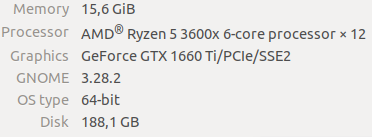
Dear developers,
I'm trying to achieve an AirSim RL environment (much like the OpenAI environments). Following the car RL example in the documentation, I've created the following class below. However I stumbled upon some issues:
-
I'm trying to achieve a high frame rate from the client.simGetImages() for depthview. The highest frame rate I got was around 15 FPS with the following settings (below). I've tried to change the viewmode to "NoDisplay" but this drops the frame rate to 1 FPS and lowering the resolution in the CaptureSettings didn't help either.
-
Running the binary for a long time results sometimes in a sudden crash (log below), I'm running the binary as follows:
./AirSimNH.sh -vulkan -novsync -benchmark (also tried with -opengl4 flag, but eventually crashes as well)
-
Is there a way to disable newly added animals?
Much thanks in advance!
The Environment class with main loop to measure FPS:
    class AirSim:
    def __init__(self):
        self.client = airsim.CarClient()
        self.client.confirmConnection()
        self.client.enableApiControl(True)
        self.car_controls = airsim.CarControls()

    def reconnect(self):
        self.client = airsim.CarClient()
        self.client.confirmConnection()
        self.client.enableApiControl(True)
        self.car_controls = airsim.CarControls()

    # return depth view images (84x84)
    def getImg(self):
        responses = self.client.simGetImages([airsim.ImageRequest("0", airsim.ImageType.DepthPerspective, True, False)])
        img = self.transformInput(responses)
        return img

    def transformInput(self, responses):
        img1d = np.array(responses[0].image_data_float, dtype=np.float)
        img1d = 255 / np.maximum(np.ones(img1d.size), img1d)
        img2d = np.reshape(img1d, (responses[0].height, responses[0].width))

        from PIL import Image
        image = Image.fromarray(img2d)
        im_final = np.array(image.resize((84, 84)).convert('L'))

        return im_final

    def interpret_action(self, action):
        self.car_controls.brake = 0
        self.car_controls.throttle = 1
        if action == 0:
            self.car_controls.throttle = 0
            self.car_controls.brake = 1
        elif action == 1:
            self.car_controls.steering = 0
        elif action == 2:
            self.car_controls.steering = 0.5
        elif action == 3:
            self.car_controls.steering = -0.5
        elif action == 4:
            self.car_controls.steering = 0.25
        else:
            self.car_controls.steering = -0.25

        return self.car_controls

    def compute_reward(self, car_state):
        MAX_SPEED = 300
        MIN_SPEED = 10
        thresh_dist = 3.5
        beta = 3

        z = 0
        pts = [np.array([0, -1, z]), np.array([130, -1, z]), np.array([130, 125, z]), np.array([0, 125, z]),
               np.array([0, -1, z]), np.array([130, -1, z]), np.array([130, -128, z]), np.array([0, -128, z]),
               np.array([0, -1, z])]  # points in Neighborhood
        pd = car_state.kinematics_estimated.position
        car_pt = np.array([pd.x_val, pd.y_val, pd.z_val])

        dist = 10000000
        for i in range(0, len(pts) - 1):
            dist = min(dist, np.linalg.norm(np.cross((car_pt - pts[i]), (car_pt - pts[i + 1]))) / np.linalg.norm(
                pts[i] - pts[i + 1]))

        # print(dist)
        if dist > thresh_dist:  # the max deviation
            reward = float(-3)
        else:
            reward_dist = (
                        math.exp(-beta * dist) - 0.5)  # dist=3.5 -> reward_dist≃-0.5         dist=0 -> reward_dist≃0.5
            reward_speed = (((car_state.speed - MIN_SPEED) / (
                        MAX_SPEED - MIN_SPEED)) - 0.5)  # max reward_speed = 1          min reward_speed ≃ -0.5
            reward = reward_dist + reward_speed  # min reward >≃ -1        max reward = 1

        return reward

    def isDone(self, car_state, car_controls, reward):
        done = 0
        if reward < -1.5:
            done = 1

        if car_controls.brake == 0:
            if car_state.speed <= 5:
                done = 1
        return done

    def step(self, action):
        #interpret action (number) to actual car_controls
        car_controls = self.interpret_action(action)
        self.client.setCarControls(car_controls)

        car_state = self.client.getCarState()
        reward = self.compute_reward(car_state)
        done = self.isDone(car_state, car_controls, reward)
        img = self.getImg()
        #punish harder if episode is done
        if done == 1:
            reward = float(-10)

        return img, reward, done, car_state

    def reset(self):
        self.client.reset()
        self.client.enableApiControl(True)
        self.client.armDisarm(True)
        car_control = self.interpret_action(1) # Reset position and drive straight for one second
        self.client.setCarControls(car_control)
        time.sleep(5)
        return self.getImg()


    if __name__ == '__main__':
    env = AirSim()

    state = env.reset()
    while True:
        start_time = time.time()  # start time of the loop

        img, reward, done, car_state = env.step(1) # each step() calls for client.simGetImages()

        if done:
            env.reset()

        print("FPS: ", 1.0 / (time.time() - start_time))  # FPS = 1 / time to process loop
Settings.json:
settings.txt
Crash log:
log.txt
OS: Ubuntu 18.04.4 LTS

Using AirSim Neighborhood binary v1.3.0-Linux
Python version: 3.6.9
My hardware:
Dear developers,
I'm trying to achieve an AirSim RL environment (much like the OpenAI environments). Following the car RL example in the documentation, I've created the following class below. However I stumbled upon some issues:
I'm trying to achieve a high frame rate from the client.simGetImages() for depthview. The highest frame rate I got was around 15 FPS with the following settings (below). I've tried to change the viewmode to "NoDisplay" but this drops the frame rate to 1 FPS and lowering the resolution in the CaptureSettings didn't help either.
Running the binary for a long time results sometimes in a sudden crash (log below), I'm running the binary as follows:
./AirSimNH.sh -vulkan -novsync -benchmark (also tried with -opengl4 flag, but eventually crashes as well)
Is there a way to disable newly added animals?
Much thanks in advance!
The Environment class with main loop to measure FPS:
Settings.json:
settings.txt
Crash log:
log.txt