AirSim Version/#commit: 1.4.0
UE/Unity version: Unity 2019.3.12.f1
autopilot version: - N/A
OS Version: Ubuntu 18.04
Question
Error Occurred when loading Unity demo.
When opening the Unity demo following instructions on https://microsoft.github.io/AirSim/Unity/#usage, following errors pop up:

Detailed message of the error is showing as following:
1."Assets/AirSimAssets/Scripts/Vehicles/VehicleCompanion.cs(199,76): error CS0103: The name 'fov_degrees' does not exist in the current context"
2.Assets/AirSimAssets/Scripts/Vehicles/VehicleCompanion.cs(199,45): error CS1061: 'IVehicleInterface' does not contain a definition for 'SetDistortionParam' and no accessible extension method 'SetDistortionParam' accepting a first argument of type 'IVehicleInterface' could be found (are you missing a using directive or an assembly reference?)
As a result, the Unity demo won't run after pressing the play button.
No errors were reported during the process of building AirSim and AirsimWrapper Shared Library. SimModeSelector scene is also loaded into the scene hierarchy pane.
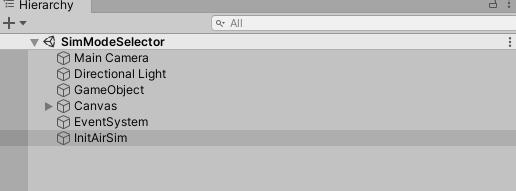
Any help or suggestions on how to debugging this is extremely appreciated.
AirSim Version/#commit: 1.4.0
UE/Unity version: Unity 2019.3.12.f1
autopilot version: - N/A
OS Version: Ubuntu 18.04
Question
Error Occurred when loading Unity demo.
When opening the Unity demo following instructions on https://microsoft.github.io/AirSim/Unity/#usage, following errors pop up:

Detailed message of the error is showing as following:
1.
"Assets/AirSimAssets/Scripts/Vehicles/VehicleCompanion.cs(199,76): error CS0103: The name 'fov_degrees' does not exist in the current context"2.
Assets/AirSimAssets/Scripts/Vehicles/VehicleCompanion.cs(199,45): error CS1061: 'IVehicleInterface' does not contain a definition for 'SetDistortionParam' and no accessible extension method 'SetDistortionParam' accepting a first argument of type 'IVehicleInterface' could be found (are you missing a using directive or an assembly reference?)As a result, the Unity demo won't run after pressing the play button.
No errors were reported during the process of building AirSim and AirsimWrapper Shared Library. SimModeSelector scene is also loaded into the scene hierarchy pane.

Any help or suggestions on how to debugging this is extremely appreciated.