HINGE — into a Vite project we inject a small helper, which allows you to pinpoint the part of the website you need the agent to alter. It works as a Vite plugin alongside HMR -- so changes automagically appear on the site while you're on it, surfing and looking for the next problem to solve.
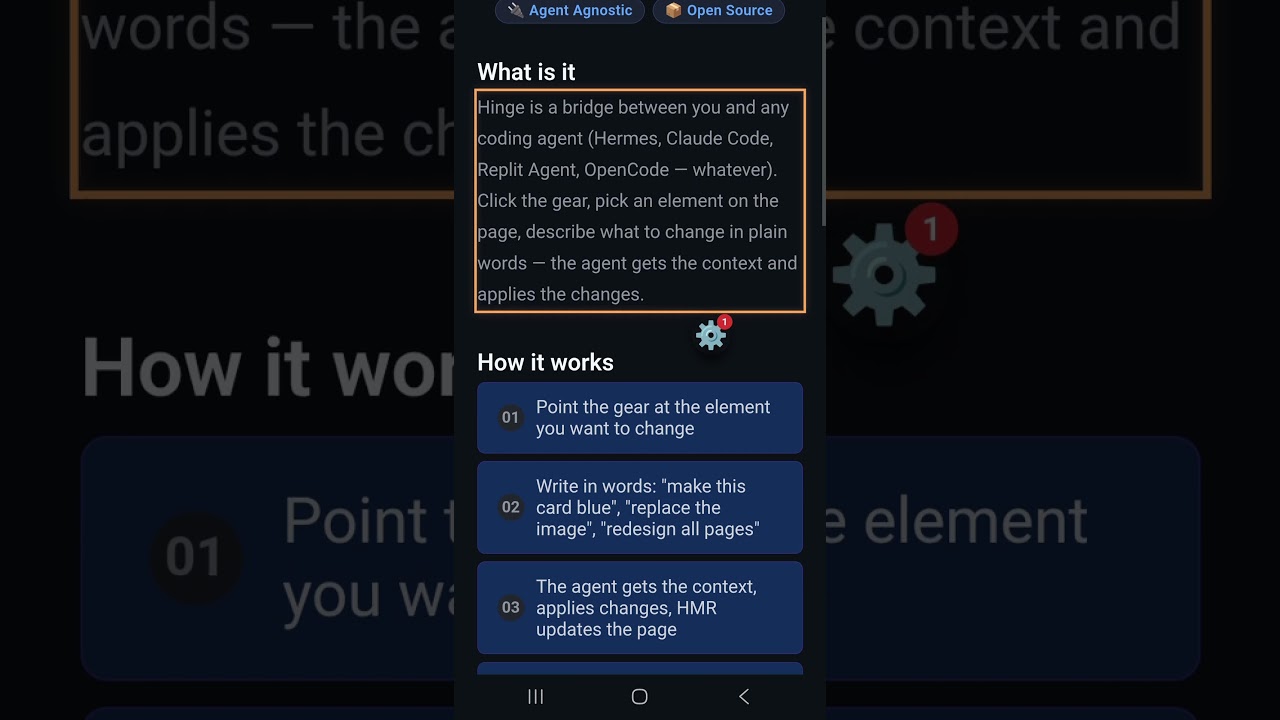
And it works right from your phone. I use it with Hermes and the hinge-projects skill
(project.sh + Cloudflare dev tunnels) — so I get access to my frontend project running
with Hinge injected.
While Hermes is running in Docker on my laptop, piloted by DeepSeek-v2, I manage my projects using Hinge and tunnels -- when I have a free minute I take my phone, find a thing to change on my site and just point my agent to fix that.
I can even share the access with my non-tech friend who works on the same site and she can leave her messages in the queue or immediately run the task.
- Cog overlay — draggable floating button. Tap to open the panel. Drag to reposition.
- Input tab — type instructions, attach files/components, voice input (mic), send to queue.
- File tree — browse the project, select files to include in the task context.
- Source viewer — read any file with syntax highlighting (highlight.js). Live-updates while the agent works (polls
chat.log). - Task queue — all instructions go to a queue. Agent processes them one by one. Real-time chat history per task.
- Element targeting — click UI elements on the page to tell the agent exactly what to modify.
- Voice input — record and transcribe via whisper.
- Persistence — all state survives page reload: tabs, file selections, expanded accordions, drawer width, exec mode, locale.
- i18n — English and Russian (auto-saves preference).
- Mobile-friendly — responsive panel, touch controls, works from a phone browser.
HINGE is agent-agnostic. To plug in any agent backend (Claude Code, Codex, OpenCode, Aider, etc.), edit the three scripts in .hinge/. They are auto-generated on first pnpm dev — edit freely.
Called when a new task is submitted to the queue.
| argv[1] | alias — task folder name (e.g. 2026-07-06T19-36-40_139Z) |
| stdin | user instruction + attached context (file tree, component targets) |
| stdout | agent's response (markdown text) |
| Side effect | save alias → session_id mapping for follow-up messages |
#!/bin/bash
set -e
ALIAS="$1"
INPUT=$(cat)

# Your agent call here — example with any CLI agent:
# OUTPUT=$(my-agent --input "$INPUT" 2>&1)

# Extract session ID (if your agent supports resumable sessions)
# SESSION_ID=...
# echo "$ALIAS=$SESSION_ID" >> "$(dirname "$0")/.sessions_map.txt"

echo "$OUTPUT"Called when the user sends a follow-up message in an existing task.
| argv[1] | alias — same task folder name |
| stdin | follow-up message text |
| stdout | agent's response (markdown text) |
| Lookup | reads alias → session_id from .sessions.json or .sessions_map.txt |
#!/bin/bash
set -e
ALIAS="$1"
INPUT=$(cat)
DIR="$(dirname "$0")"

# Look up session ID saved by new-session.sh
SESSION_ID=""
[ -f "$DIR/.sessions_map.txt" ] && SESSION_ID=$(grep "^$ALIAS=" "$DIR/.sessions_map.txt" | cut -d= -f2)

if [ -n "$SESSION_ID" ]; then
  # Resume session
  OUTPUT=$(my-agent --resume "$SESSION_ID" --input "$INPUT" 2>&1)
else
  # Fallback: create new session
  OUTPUT=$(my-agent --input "$INPUT" 2>&1)
  NEW_ID=...
  # echo "$ALIAS=$NEW_ID" >> "$DIR/.sessions_map.txt"
fi

echo "$OUTPUT"Called when the user records a voice message.
| argv[1] | path to .webm audio file |
| stdout | transcribed text |
#!/bin/bash
set -e
AUDIO_FILE="$1"

# Example with faster-whisper:
python3 -c "
import sys
from faster_whisper import WhisperModel
model = WhisperModel('tiny', device='cpu', compute_type='int8')
segments, _ = model.transcribe(sys.argv[1])
for seg in segments:
    print(seg.text)
" "$AUDIO_FILE".agent-wrapper.sh is auto-generated and handles lifecycle: writes PID, calls new-session.sh or continue-session.sh, appends output to chat.md, renames _processing → _done on exit, cleans up on SIGTERM. The three scripts above are the only customization surface.
pnpm install
pnpm dev
Open http://localhost:5176 in your browser. The cog appears in the bottom-right corner.
- Tap the cog 🔧 — the panel slides out.
- Type what you want — e.g. "Make the header sticky".
- Point at UI elements — click elements on the page to attach them as context.
- Select files — switch to the Files tab, check files the agent should read.
- Add to queue — the instruction goes into the task queue.
- The agent works — HINGE spawns an agent session, logs progress in real-time.
- Watch the source change — switch to Source tab to see files being edited live.
HINGE runs in dev only (Vite plugin + overlay UI). The API is served on the same port as your Vite dev server — no second process, no proxy config, no extra port to open in tunnels.
All routes live under /hinge-api (see API_BASE in src/const.ts).
pnpm add hinge
# or npm install hingeAdd the plugin to vite.config.ts. On first pnpm dev it auto-creates .hinge/ with agent
scripts (new-session.sh, continue-session.sh, whisper.sh, internal wrapper).
// vite.config.ts
import { defineConfig } from 'vite'
import vue from '@vitejs/plugin-vue'
import hingePlugin from 'hinge/plugin'

export default defineConfig({
  plugins: [
    vue(),
    hingePlugin(),   // mounts /hinge-api/* as Vite middleware
  ],
  server: {
    port: 5173,      // any port — API follows automatically
  },
})
What the plugin does:
- Registers
GET/POST /hinge-api/*middleware on the Vite dev server - Generates
.hinge/agent scripts if missing - Runs queue recovery on startup and every 5 minutes
You do not need server.proxy, serverPort, or a separate API port.
Use the Hinge component so it shares your app's Vue instance:
<!-- App.vue — inside your root layout -->
<template>
  <v-app>
    <router-view />
    <Hinge />
  </v-app>
</template>

<script setup>
import { Hinge } from 'hinge/component'
import 'hinge/style.css'
</script>// main.ts
import { mountHinge } from 'hinge'
import 'hinge/style.css'
mountHinge('body')Still requires the Vite plugin in vite.config.ts for file/queue API.
After the first dev start, edit .hinge/new-session.sh and .hinge/continue-session.sh
to call your agent CLI (Hermes, Claude Code, etc.). See Agent scripts above.
For the Hinge repo itself (pnpm dev on :5176), the plugin passes isMainApp: true so the
cog stays on top. Consumers can ignore this:
hingePlugin({ isMainApp: true })Expose one port — your Vite dev server. Example Cloudflare tunnel:
cloudflared tunnel --url http://localhost:5173The browser loads the app and calls /hinge-api/... on the same origin — no second tunnel.
src/server.ts exports startHingeServer(port) for running the API outside Vite (custom Node
server, integration tests). Normal consumer setup uses middleware only — you do not call this.
| Import | Path | Description |
|---|---|---|
hinge |
hinge |
mountHinge() — full UI with bundled Vue |
hinge/style.css |
hinge/style.css |
Component styles |
hinge/component |
hinge/component |
Hinge Vue component (uses host Vue) |
hinge/plugin |
hinge/plugin |
Vite plugin — API middleware + agent script bootstrap |
- Node.js 18+
- pnpm (recommended) or npm
- An agent runner (default: Hermes — bundled scripts in
.hinge/)
| Command | Description |
|---|---|
pnpm dev |
Start dev server (default :5174) with API at /hinge-api on the same port |
pnpm build |
Typecheck + build to dist/ |
pnpm preview |
Preview production build |
Production workflow uses ../project.sh — not raw pnpm dev.
See ../skills/hinge-projects.md for the full agent skill.
# from the directory containing project.sh:
./project.sh hinge restart
./project.sh hinge status       # shows Hinge API: ok|fail
project.sh assigns a stable port, starts cloudflared tunnel, kills orphan Vite on restart,
and verifies /hinge-api/status returns JSON after start.
.hinge/                  # Agent runtime: sessions, state, helpers
├── new-session.sh       # Spawn a new agent session
├── continue-session.sh  # Resume an existing session
├── .agent-wrapper.sh    # Internal wrapper
├── whisper.sh           # Audio transcription
└── <task-folders>/      # Per-task directories

src/
├── main.ts              # mountHinge() entry point
├── component.ts         # Vue component export
├── plugin.ts            # Vite plugin
├── server.ts            # API router + Vite middleware (optional standalone HTTP)
├── const.ts             # API_BASE, shared constants
├── Hinge.vue            # Root Vue component
├── components/
│   ├── HingeCog.vue         # Floating cog / burger
│   ├── HingeMenuToggle.vue  # Mobile hamburger
│   ├── HingePanel.vue       # Main panel (tabs + layout)
│   ├── HingeTabQueue.vue    # Task queue + chat
│   ├── HingeAttach.vue      # File/component attachment
│   ├── HingeMic.vue         # Voice recording
│   ├── TestBtn.vue          # Test trigger
│   └── ToastContainer.vue   # Toast notifications
├── composables/
│   ├── usePersistedState.ts # State persistence
│   ├── useI18n.ts           # i18n (en/ru)
│   ├── useFileTree.ts       # Project file browser
│   ├── useFileSource.ts     # File content viewer
│   ├── useSelectionStore.ts # UI element selection
│   ├── useElementHighlights.ts
│   ├── useCogPosition.ts    # Drag positioning
│   ├── useModeDropdown.ts   # Shared mode split-button
│   └── ...
├── utils/
│   ├── queueApi.ts          # Queue HTTP helpers
│   ├── buildComponentBlock.ts
│   ├── highlightLang.ts
│   └── queueTrace.ts        # Queue debug logging
├── locales/
│   ├── en.ts                # English strings
│   └── ru.ts                # Russian strings
└── types/
    ├── target.ts
    └── config.ts
Vibecoding is amazing for rapid prototyping. But sometimes you want to see what the agent changed, browse the file tree, and have a real conversation with the code — not just a one-shot prompt.
HINGE bridges that gap: the tactile feel of a full IDE, the convenience of a browser overlay, the power of agent-driven code modification. Use it on desktop. Use it on mobile. Use it anywhere you have a browser and an idea.
- tsol/hinge-projects —
project.sh, scaffolding, one-command install with Hermes + Cloudflare tunnels