Create Apple Shortcuts with natural language using Claude Code or Codex.
Shortcuts Playground is a plugin for Claude Code and Codex that lets you turn any idea into a shortcut for Apple's Shortcuts app. Describe what you want in plain English; a few minutes later, you get a real, signed .shortcut file ready to import into the Shortcuts app.
Under the hood, shortcuts have always been XML files that get signed and encrypted into a special, Apple-only .shortcut format. Shortcuts Playground ships a comprehensive knowledge base that teaches Claude and Codex how Shortcuts actions work, what syntax they use, and how they connect to one another. Agents generate the XML, validate it through a loop, and sign it using Apple's native shortcuts CLI.
For OS 27-era Shortcuts, the plugin also ships target-gated ToolKit v78 action coverage from macOS 27 and iOS 27 Simulator, plus reviewed static Apple-derived grounding, parameter-key, enum-case, automation-trigger, and exported WFWorkflowTriggers catalogs. Those catalogs are generated from Apple's local ToolKit/ToolRenderer/WorkflowKit metadata and maintainer-exported shortcut XML, then packaged as JSON so existing users do not need macOS 27 or private Apple frameworks.
The result is a valid shortcut, built from a sentence.
A project by Federico Viticci. Read more here.
v1.2.1 extends the early, opt-in macOS/iOS 27 support while keeping macOS 26 users on the existing validation surface by default.
- macOS/iOS 27 ToolKit v78 action snapshots, parameter catalogs, enum catalogs, trigger metadata, and sanitized exported
WFWorkflowTriggerssamples ship as static JSON; users do not need macOS 27 or private Apple frameworks installed. - New OS 27-era authoring coverage includes Stored Content, Add Item to List, Otherwise If, Get Selected Text, Get What's On Screen, VPN actions, Notes markdown, Safari tab groups, route options, and several AppIntent parameter/enum updates.
- The OS 27 automation header catalog includes exported Display and Stage Manager samples plus conservative External Drive, File Modified, and Folder Changed coverage. Display and Stage Manager have copyable headers; current Mac drive/file/folder exports are documented as lossy and require manual picker configuration in Shortcuts.
- Validators now catch more blank fields, wrong input keys, bad enum values, invalid boolean parameters, AppIntent schema typos, conditional wiring errors, and signing/import pitfalls across both Claude Code and Codex.
- OS 27-only identifiers and parameters require
target_macos = "27"/SHORTCUTS_PLAYGROUND_TARGET_MACOS=27; default validation remains conservative for existing macOS 26 users.
You can install Shortcuts Playground in either Claude Code or Codex. At the moment, the Claude Code version of the plugin offers a richer experience thanks to dedicated commands and agents.
- Build from scratch. In Claude Code, type
/shortcuts-playground:buildfollowed by a description of the shortcut you want. Claude designs the action list, wires variables, picks an icon, validates the XML through a self-correcting loop, and signs the result. - Remix an existing shortcut. Type
/shortcuts-playground:remixwith a path to an unsigned.xmlshortcut file and describe what to change. The agent applies a surgical diff — preserving every action, UUID, and icon you didn't ask to touch. - Automatic validation. Claude Code runs a
PostToolUsehook on every file write. Codex can do the same when Codex plugin hooks are enabled with[features].plugin_hooks = true. Errors feed back into the agent's context so it can fix them before signing. This is called a Craig Loop. It adds a few seconds of latency but dramatically improves output quality.
- macOS. The signing step uses the built-in
shortcutsCLI, which is macOS-only. - Claude Code or Codex. Install from claude.com/claude-code or openai.com/codex. Either the desktop apps or CLIs will work.
- Python 3.10+. The bundled validator requires 3.10 or later. The system Python on older macOS versions ships 3.9 and will fail. Install a newer version via Homebrew (
brew install python3) or setSHORTCUTS_PLAYGROUND_PYTHONto point at your interpreter.
Two commands. Run them from any directory:
# 1. Register the marketplace
claude plugin marketplace add https://github.com/viticci/shortcuts-playground-plugin

# 2. Install the plugin
claude plugin install shortcuts-playground@shortcuts-playground
Claude Code clones the repository into its plugin cache on first install. If the clone fails with a GitHub auth error, make sure git clone https://github.com/viticci/shortcuts-playground-plugin.git works in your terminal first.
- Open Claude for Mac and start a new Claude Code session (the terminal panel at the bottom).
- Click the terminal input area and run the same two commands:
claude plugin marketplace add https://github.com/viticci/shortcuts-playground-plugin claude plugin install shortcuts-playground@shortcuts-playground - Start a new session to load the plugin.
Codex installs plugins from marketplaces. This repository includes a Codex marketplace at .agents/plugins/marketplace.json, which points at the Codex package in ./codex.
Register the marketplace, then install the plugin from Codex's plugin browser:
# 1. Register the marketplace
codex plugin marketplace add https://github.com/viticci/shortcuts-playground-plugin

# 2. Open Codex
codex
Inside Codex, type /plugins, choose the Shortcuts Playground marketplace, open Shortcuts Playground, and select Install plugin. Start a new session to load the plugin.
For local development from a cloned checkout, register the checkout instead of GitHub:
codex plugin marketplace add /absolute/path/to/shortcuts-playground-plugin- Open the Codex app and make sure you're signed in.
- Register the marketplace once from Terminal:
codex plugin marketplace add https://github.com/viticci/shortcuts-playground-plugin - Open Plugins in the Codex app, switch to the Shortcuts Playground marketplace, open Shortcuts Playground, and click the plus button or
Add to Codex. - To enable automatic validation, add
[features].plugin_hooks = trueto~/.codex/config.toml, then review/trust the hook from/hooksif Codex prompts for it. - Start a new thread to load the plugin.
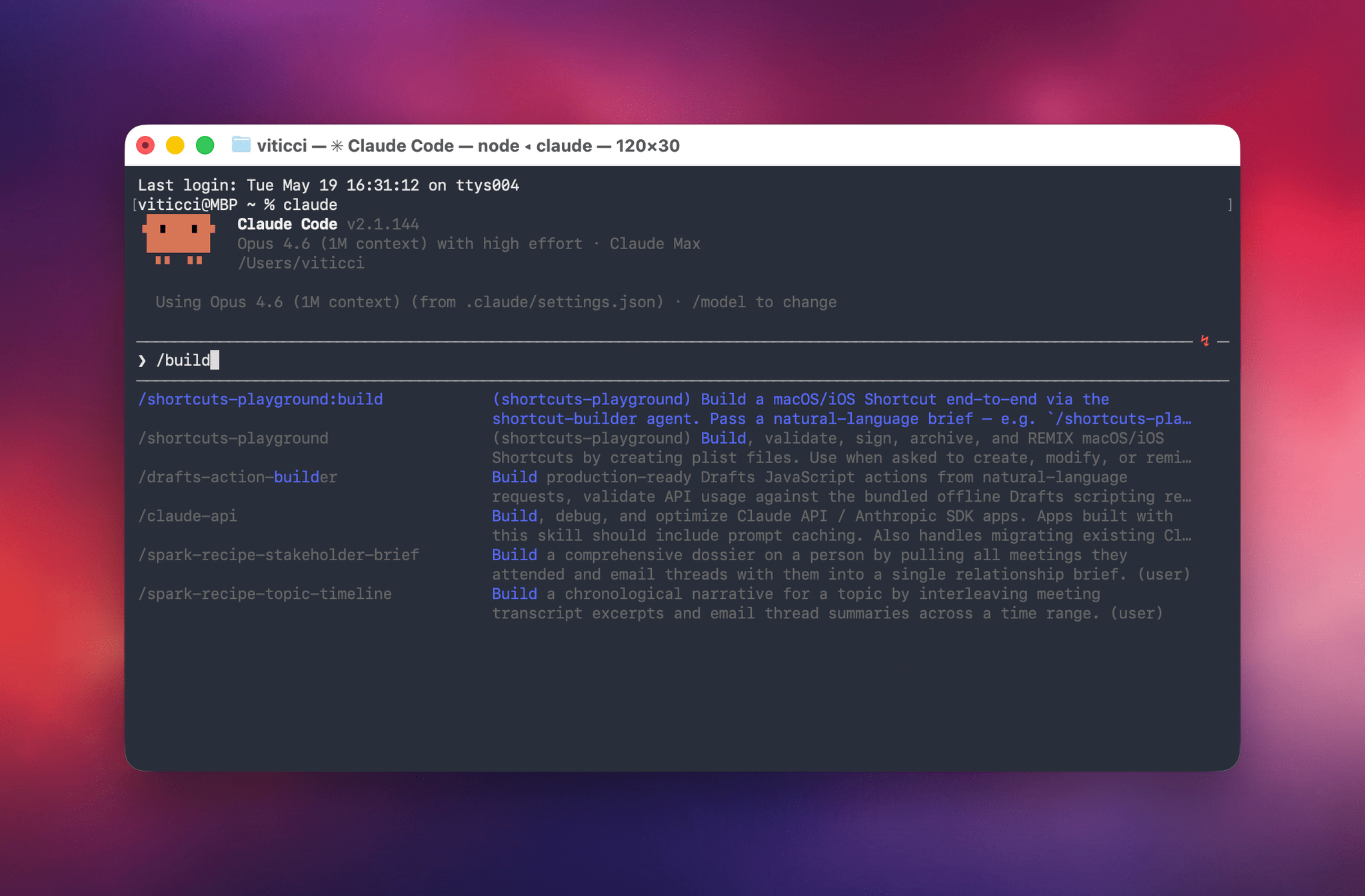
/shortcuts-playground:build a shortcut that asks for a city, fetches the current weather, and shows a notification
Or just describe what you want in natural language — Claude's skill auto-invocation will pick up the intent:
Build me a shortcut that takes my 5 most recent screenshots and sends them to a contact on iMessage
When it's done, open the signed .shortcut file from ~/Documents/Shortcuts Playground/ in Finder. Shortcuts.app will offer to import it.
Point it at an unsigned .xml file and describe the change:
/shortcuts-playground:remix /Users/you/Documents/Shortcuts Playground/drafts/Weather.xml add a notification at the start saying "Fetching weather…"
The remix preserves everything you didn't ask to change. Your original file is never overwritten.
Shortcuts Playground can take you roughly 90% of the way to a complete, functioning shortcut. The remaining 10% should be checked and refined by you. In testing, it was able to one-shot dozens of simple shortcuts using Apple's built-in actions, as well as complex shortcuts involving web APIs, advanced logic, SSH, shell scripting, and more.
Common things to watch for:
- Variables. Occasionally a field will be empty where a variable connection is needed. You'll need to go in there and manually connect that variable or parameter yourself.
- Repeat loops. Double-check the wiring inside loops: variable scope can get tricky.
- Always inspect the result. Open the shortcut in the Shortcuts app and walk through it before relying on it. This is good friction: you'll learn a lot about how shortcuts work from the inside.
For best results, use Claude Opus 4.6/4.7 or GPT 5.5 as the underlying models. Higher reasoning efforts produce better outputs, but introduce latency.
| Component | Purpose |
|---|---|
Skill (skills/shortcuts-playground/) |
The complete Shortcuts knowledge base: reference material, mandatory best-practice rules, verified action identifiers from Apple's ToolKit v63 plus target-gated macOS/iOS 27 ToolKit v78 coverage, OS 27 parameter/trigger catalogs, and golden example XMLs. |
Build agent (agents/shortcut-builder.md) |
Specialized agent that owns the full design, build, validate, sign, and archive loop for new shortcuts. |
Remix agent (agents/shortcut-remixer.md) |
Specialized agent that applies a surgical diff to an existing unsigned XML shortcut. |
Validation hook (hooks/) |
PostToolUse hook that runs the Craig Loop validator on Shortcuts XML writes. Codex requires [features].plugin_hooks = true. |
CLI wrappers (bin/) |
validate-shortcut, resolve-icon, sign-shortcut, shortcuts-playground-selftest — added to Claude's PATH when the plugin is enabled. |
Slash commands (commands/) |
/shortcuts-playground:build and /shortcuts-playground:remix. |
By default, shortcuts are saved to ~/Documents/Shortcuts Playground/:
~/Documents/Shortcuts Playground/
├── My Shortcut.shortcut          # signed file — open to import
├── drafts/
│   └── My Shortcut.xml           # working unsigned draft
└── 2026-05-09/
    └── My Shortcut-151223.xml    # dated archive
To change the output directory, edit ~/.claude/settings.json:
{
  "pluginConfigs": {
    "shortcuts-playground@shortcuts-playground": {
      "options": {
        "output_dir": "/Users/you/Documents/Shortcuts Playground",
        "target_macos": "auto",
        "target_platform": "macos"
      }
    }
  }
}
The plugin also supports signing_mode (anyone for public distribution, people-who-know-me for contacts only), target_macos (auto, 26, 27, or latest), and target_platform (macos, ios, or all). Default validation detects the host macOS version, falls back to macOS 26 if the host cannot be detected, and targets macos. Use target_macos = "27" only when intentionally building Golden Gate-era shortcuts, and target_platform = "ios" only when authoring iPhone/iPad-only actions.
A companion Shortcuts Playground Remote shortcut that communicates with Claude Code and Codex over SSH – letting you generate shortcuts from iPhone and iPad – is available exclusively for Club MacStories members.
claude plugin update shortcuts-playground@shortcuts-playgroundStart a new Claude Code session after updating to pick up changes to agents and hooks.
claude plugin uninstall shortcuts-playground@shortcuts-playground
claude plugin marketplace remove shortcuts-playground
Your ~/Documents/Shortcuts Playground/ directory stays intact.
This repository ships plugins for two agent runtimes:
| Folder | Runtime | Notes |
|---|---|---|
claude/ |
Claude Code | Full plugin with skill, slash commands, specialized agents, PostToolUse hook, and CLI wrappers. |
codex/ |
Codex | Codex-compatible plugin with bundled skill, validator/signing scripts, and opt-in PostToolUse validation hook. |
The root .claude-plugin/marketplace.json installs the Claude Code plugin from ./claude. The root .agents/plugins/marketplace.json installs the Codex plugin from ./codex.
For detailed technical documentation, see claude/README.md and claude/INSTALL.md.
by Federico Viticci, MacStories.net
MIT.